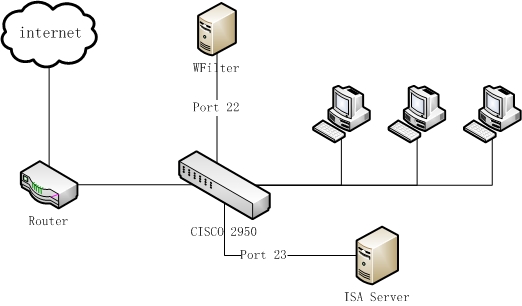
Figure 1
This tutorial will guide you to configure WFilter to monitor local proxy servers and email servers.
An office network uses ISA as the proxy server connected to a cisco 2950 switch, with below network topology diagram:
There have two solutions for this network topology.
For solution 2, you only need to mirror the ISA server's traffic to the WFilter computer. In this example, "port 23" is configured as the source mirrored port, while "port 22" is the target mirroring port.
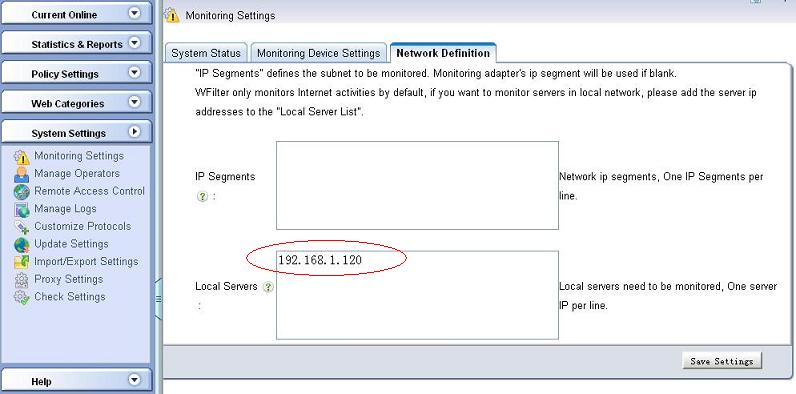
Because WFilter only monitors the internet traffic in default, to get it work, you also need to add the proxy server's ip address into the "Local Servers" settings in "System Settings"->"Monitoring Settings" of WFilter. In this example, let's suppose the proxy server ip address is "192.168.1.120".
An office network uses a local email server connected to a cisco 2950 switch, with below network topology diagram:
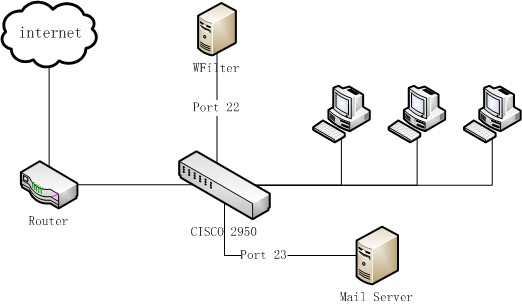
To monitor emails in this network, you need to mirror both the internet traffic and email server traffic to the WFilter computer.
In this example, "port 22" is the target mirroring port, internet "port 21" and email "port 23" shall both be configured as the source mirrored ports.
Because WFilter only monitors the internet traffic in default, to get it work, you also need to add the email server's ip address into the "Local Servers" settings in "System Settings"->"Monitoring Settings" of WFilter. In this example, let's suppose the email server ip address is "192.168.1.120".