Pass-by or Pass-through, which WFilter deployment mode shall I choose?
4.0
- Author:
- IMFirewall Software
- HomePage:
- http://www.imfirewall.us
1. Introduction
WFilter supports two kinds of deployment mode: pass-by mode and pass-through mode.
In pass-by mode, you need to setup a mirroring port in your switch/router, and connect the WFilter computer to the mirroring port to do monitoring/filtering.
In this mode, WFilter analyse copies of the network packets and does not delay the original packets. Network topology diagram:
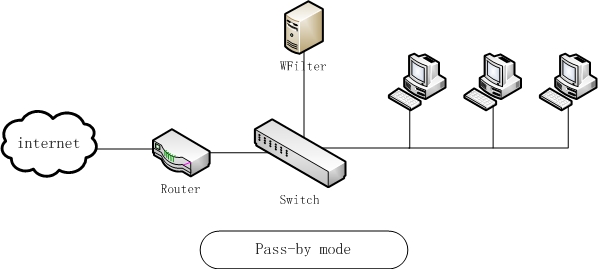
Pass-by mode
In pass-through mode, WFilter shall be installed in a windows gateway, bridge, or proxy server. Network topology diagram:
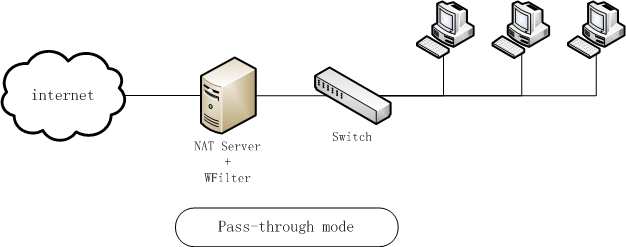
Pass-through mode
2. Advantages and disadvantages
2.1 Pass-by mode
2.1.1 Advantages
- Pass-by mode is easier to setup. You can do it simply by setting up a mirroring port, without any change to your network topology. However, pass-through mode requires more effort to setup a gateway/bridge/proxy server.
- In pass-by mode, WFilter analyse copies of the network packets and does not delay the original packets. So your internet speed will not be affected. However, in pass-through mode, because all network packets pass through the monitoring server, there might be a slight delay.
- In pass-by mode, if the WFilter computer crash or power off, your internet access is still available. However, in pass-through mode, your internet will be disconnected if a gateway/bridge/proxy device stops working.
2.1.2 Disadvantages
- Your switch or router needs to support port mirroring.
- In pass-by mode, WFilter sends RST packets to terminate tcp connections. But it can not block udp traffic, so you also need to block certain udp ports in your router or firewall. Please check How to block certain UDP ports in router/firewall?
2.2 Pass-through mode
2.2.1 Advantages
- A port mirroring switch or router is not required. You only need a PC to setup a windows gateway/bridge/proxy.
- UDP traffic can also be blocked in pass-through mode.
2.2.2 Disadvantages
- It is more complicated to setup, sometimes you need to change your network topology and settings.
- It will slightly affect your internet speed if you have many client computers, depending on hardware performance of the monitoring server.
In summary, to choose a suitable deployment mode, you need to consider the following aspects: stability, hardware conditions, and technical capacity. For more information, please check WFilter Deployment Examples.
久久99日韩国产精品久久|
含羞草国产亚洲精品岁国产精品|
久久国产精品亚洲va麻豆|
西瓜视频高清在线观看免费|
久久久无码电影|
中国最新欧美精品一区二区|
337p日本大胆欧久久|
天天操 天天干 天天日|
性色蜜桃av一区二区三区|
国产毛多水多做爰爽爽爽|
捆绑白丝粉色jk震动捧喷白浆|
色综合久久无码五十路人妻|
91av视频在线观看免费|
国产精品久久久久久搜索|
国内精品久久毛片一区二区|
无遮挡18禁啪啪羞羞漫画|
国产亚洲午夜高清国产拍精品|
好吊色欧美一区二区三区视频|
色欲av|
xxxx漂亮少妇xxxxhd|
久久九九精品国产综合喷水|
男大吊丝黑鸡巴在线观看|
把腿张开抹春药调教男男|
jizz国产精品|
男女裸体做爰猛烈全过程免费视频|
欧美日韩国产一区在线看|
九九色综合久久中文字幕|
中国体育生gary飞机|
国产人澡人澡澡澡人碰视频|
久久精品av一区二区免费
|
久久久久久九九99精品|
日韩在线一区二区每天更新|
av鲁丝片一区二区三区|
年轻丰满的继牳理伦片中文|
国产亚洲午夜精品久久久|
K99久久免费国产精品|
国产高清国产精品国产专区|
东京热久久综合精品一区
|
97人人爽人人爽乱码av国产|
国产成a人亚洲精v品无码樱花|
欧美日韩成人精品久久二区|